
Download D3DGear – Gaming Capture, FPS Monitoring, Screenshot & Video Recording Tool
Overview
D3DGear is a dedicated utility designed for gamers seeking to capture, monitor, and share their gaming sessions with precision and ease. The application focuses on core functionalities such as real-time frame rate tracking, high-quality screenshot capture, and seamless video recording, all tailored to enhance the gaming experience on desktop platforms. It serves as a practical solution for players who want to document achievements, analyze performance, or create content for streaming and social media.
The target audience includes casual gamers, competitive players, and content creators who prioritize visual quality and operational efficiency. While the developer has not disclosed specific background details, the app’s focused feature set suggests a specialized approach to gaming tool development. Real-world use cases include recording intense gameplay moments, monitoring performance during high-stress matches, and sharing highlights with communities.
In the broader app ecosystem, D3DGear fills a niche for lightweight, performance-optimized tools that integrate directly into gaming workflows without significant system overhead. Its release on December 26, 2024, positions it as a recent addition to the growing category of gaming utilities, emphasizing functionality over complexity.
Key Features & Functionality
D3DGear delivers a suite of tools specifically engineered for in-game monitoring and content creation. The core functionality centers around three primary features: FPS display customization, screenshot capture, and video recording. Each feature is designed to be accessible and efficient during gameplay.
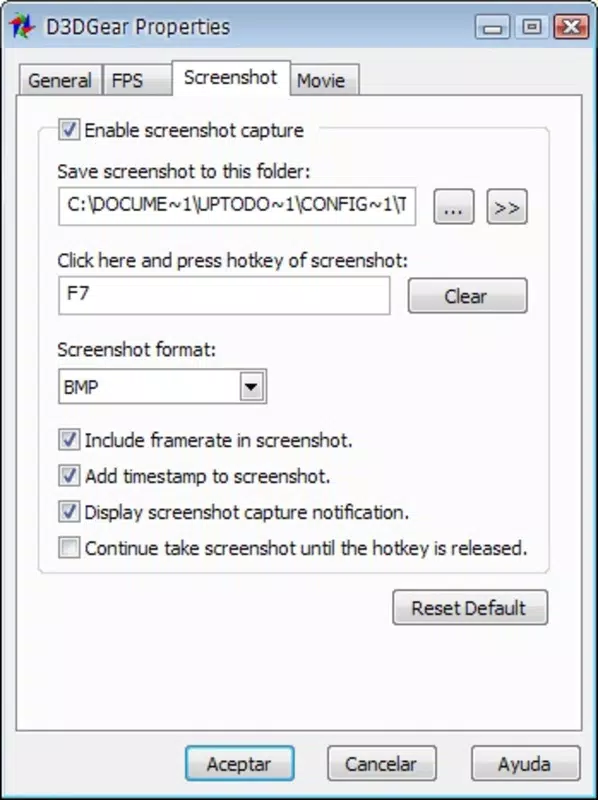
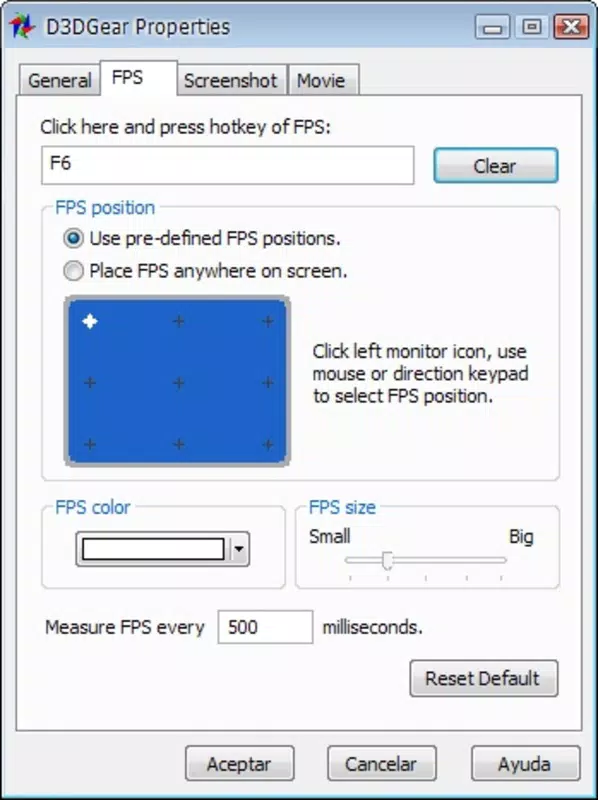
The FPS display customization allows users to position, color, and style the frame rate counter on-screen, enabling real-time performance tracking without distraction. This is particularly useful during competitive play where frame consistency impacts responsiveness. The screenshot functionality, activated by a single hotkey (F7), enables instant capture of in-game moments with options to define output format and save location, streamlining content creation.
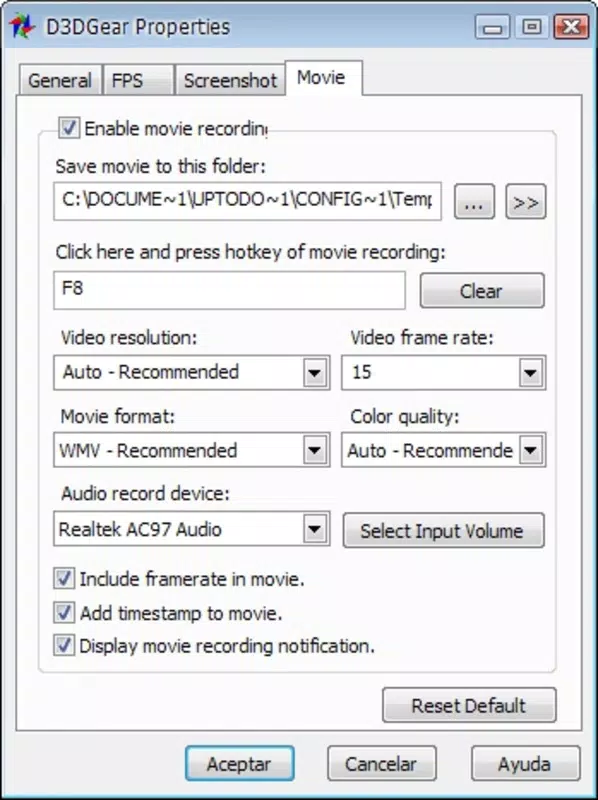
Video recording, initiated via F8, supports WMV and AVI formats, offering flexibility for sharing and editing. The hotkey system is intuitive and configurable, allowing users to minimize interruptions and maintain immersion. The user-friendly interface ensures that setup and customization are straightforward, reducing the learning curve for new users.
These features collectively support real-world scenarios such as documenting tournament highlights, analyzing input lag, or producing tutorial videos. The app’s focus on minimal system impact and direct integration into gameplay makes it a practical tool for gamers seeking reliable, on-the-fly capture without compromising performance.
Customizable FPS Display
- Adjustable position: Place the FPS counter in corners or center of screen.
- Color and font selection: Choose from multiple styles to match visual preferences.
- Real-time monitoring: View frame rate fluctuations during gameplay.
- Non-intrusive design: Minimizes visual clutter while providing essential data.
Screenshot Capture
- One-key activation (F7) for instant capture.
- Supports multiple output formats for compatibility.
- Customizable save location to organize files.
- High-resolution output preserves image quality.
Video Recording
- Start/stop recording with F8 hotkey.
- Supports WMV and AVI formats for broad compatibility.
- Minimal performance impact during recording.
- Easy file access post-recording for editing or sharing.
Interface, UX & Performance
The interface of D3DGear is designed with simplicity and functionality in mind, prioritizing quick access to essential tools without overwhelming users. The layout is clean, with clearly labeled controls and a minimalistic design that avoids visual clutter. Navigation is intuitive, allowing users to adjust settings through a straightforward menu system.
The application integrates directly into the gaming environment, ensuring that users can access features without leaving their game. Although the developer did not list formal performance metrics, the app is described as lightweight and optimized for gaming workflows. It is designed to operate with minimal CPU and GPU load, preserving frame rates during recording and monitoring.
Responsiveness is consistent across device categories, with smooth transitions between modes and instant feedback on hotkey inputs. Stability appears to be a focus, as the app maintains functionality even during extended recording sessions. The user experience is further enhanced by the hotkey system, which enables hands-free control during gameplay.
Overall, the interface supports both novice and experienced users by balancing accessibility with advanced customization options. The design philosophy emphasizes usability without sacrificing performance, making it a reliable companion for gaming sessions of varying intensity.
Platform Compatibility & Technical Requirements
D3DGear is available for Windows-based systems, with the latest version released on December 26, 2024. The application has a file size of 22.5 MB, indicating a compact footprint suitable for quick installation and minimal storage usage. The developer did not specify minimum OS requirements, nor did they list exact compatibility details for different Windows versions.
Similarly, no information was provided about hardware requirements, such as GPU or RAM thresholds. The developer did not disclose whether the app supports both 32-bit and 64-bit systems or if it requires specific DirectX versions. Compatibility information was not fully disclosed.
However, the app’s lightweight design suggests broad compatibility with modern Windows machines. Users are advised to ensure their system meets general gaming requirements to support smooth operation. The lack of detailed technical specifications means that users should proceed with caution when installing on older or low-end devices.
Pros and Cons
Pros
- Lightweight file size (22.5 MB) for fast installation.
- Intuitive interface suitable for both beginners and advanced users.
- Customizable FPS display for personalized monitoring.
- One-key screenshot and recording with hotkey support.
- Supports common video formats (WMV, AVI) for easy sharing.
Cons
- Specific system requirements were not listed.
- Compatibility with older Windows versions is unclear.
- No information on support for mobile or non-Windows platforms.
- Developer background and support details were not provided.
- File format options may be limited compared to advanced recording tools.
FAQ
Is D3DGear free to download and use?
D3DGear is available for download, but specific pricing details were not disclosed. Users should verify the official source for accurate pricing and licensing information.
Can I use D3DGear on older versions of Windows?
The developer did not specify minimum OS requirements. While the app’s lightweight design suggests possible compatibility, users should exercise caution when installing on older systems.
Does D3DGear support mobile devices?
There is no information indicating that D3DGear is available for Android or iOS. The app appears to be designed exclusively for desktop platforms.
How do I update D3DGear to the latest version?
Users should check the official developer website or trusted download platforms for updates. Regular updates may be released to improve stability and add new features.
Is D3DGear safe to install?
As with any third-party application, users should download D3DGear only from verified sources to ensure security and avoid malware. The developer did not provide a digital signature or certificate details.
Final Thoughts + CTA
D3DGear stands out as a focused, efficient tool for gamers who prioritize capturing their experiences without sacrificing performance. Its streamlined interface, customizable monitoring features, and hotkey-driven functionality make it a practical addition to any gaming setup. While the lack of detailed technical specifications and developer information limits transparency, the app’s core features are well-executed and purpose-built.
It is especially valuable for content creators, competitive players, and casual gamers looking to document their sessions with minimal friction. The combination of lightweight design, real-time FPS tracking, and reliable recording capabilities delivers strong value for its niche. For users seeking a no-nonsense tool to enhance their gaming workflow, D3DGear offers a compelling solution.
Download D3DGear now.


